Which render farm works with Blender on a Mac?
Short answer
TURNA, a render farm for Blender only, works from a Mac: its free add-on runs in Blender on macOS for Blender 4.0 to 5.3, sends your scene in one click and renders it on NVIDIA GPUs (RTX 4090 and RTX 5090, the card chosen to suit the scene), while your Mac stays free for other work.
A Mac is a fine machine for modelling and look development in Blender. The long part is the final render of an animation, which keeps the Mac busy for hours. A render farm takes that part off your desk.
How it works from a Mac
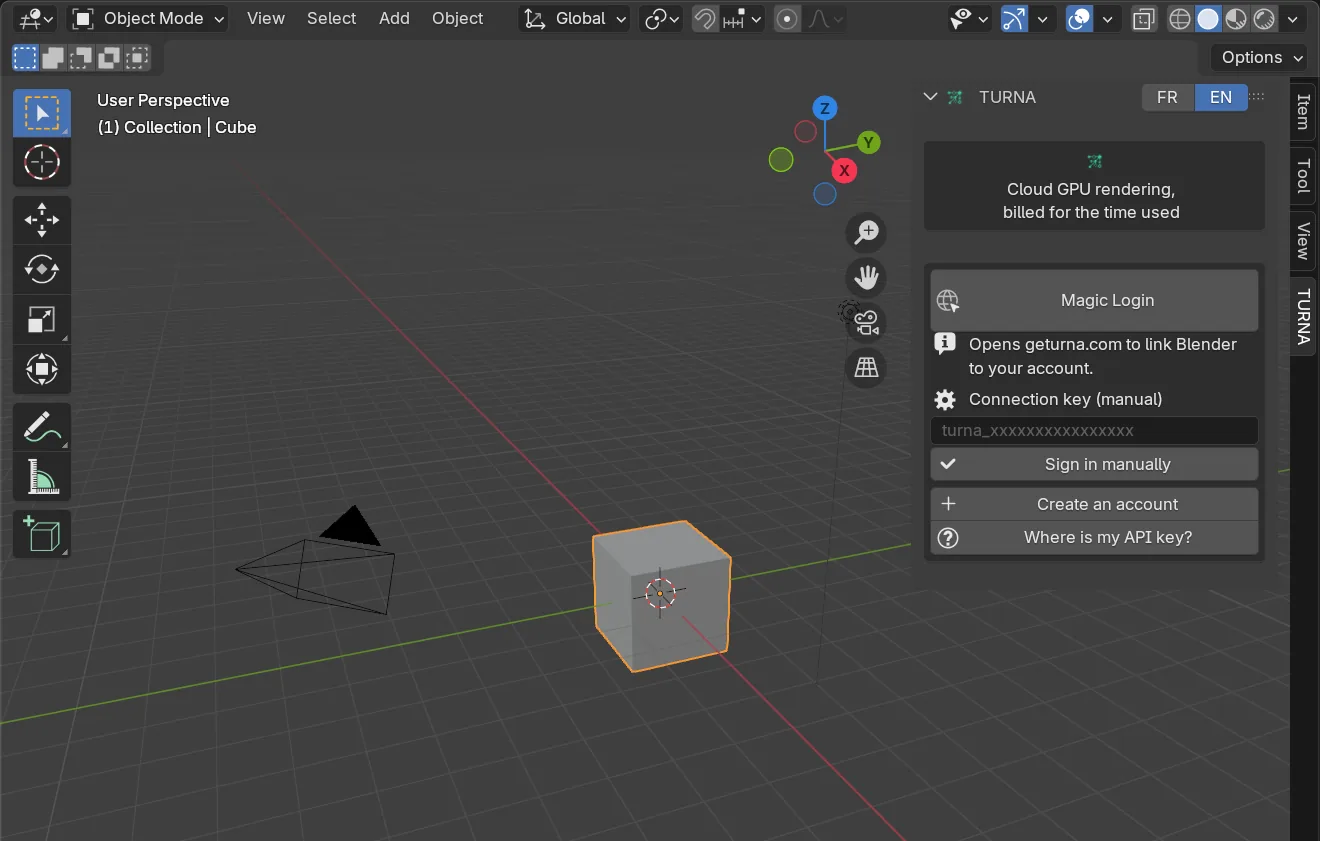
- Install the free TURNA add-on in Blender on your Mac, the same way as on Windows or Linux.
- Open your scene: the add-on shows the estimated time and cost on each tier before launch.
- Launch: the scene is packed and sent, then rendered on NVIDIA GPUs.
- The frames come back into your scene’s output folder, and stay in your account.
When a render farm is worth it on a Mac
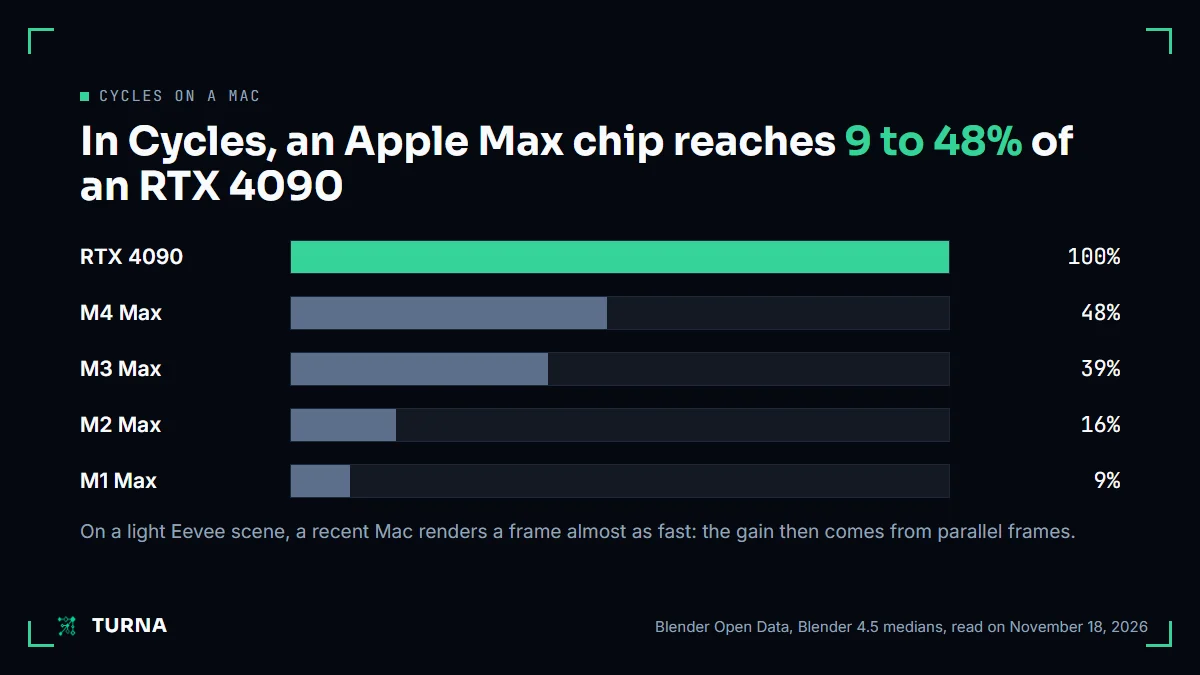
- Cycles animations. In Blender Open Data (Blender 4.5 medians, read on November 18, 2026), compared with an RTX 4090: M1 Max (32-core GPU) about 9%, M2 Max (38-core GPU) about 16%, M3 Max (40-core GPU) about 39%, M4 Max (40-core GPU) about 48%. On hundreds of frames, that gap adds up to hours. Our render time calculator turns your own time per frame into a duration and a cost.
- Light Eevee scenes. A recent Mac can render a frame almost as fast as a high-end card. The farm then helps by rendering many frames at once and keeping your Mac free, not by making each frame faster.
- A MacBook Air on a long render. Without a fan, it slows down as it heats up. Sending the render out avoids hours of throttling.
What changes between your Mac and the farm
On your Mac, Cycles renders on the GPU through Metal. On the farm, TURNA switches Cycles to the NVIDIA GPU with OptiX, or CUDA when OptiX is not available; the rest of your scene settings stay the same. Each file is rendered on the Blender version it was saved with.
For Blender on Mac in general (versions, Metal, MacBook Air), read Blender on Mac. For prices, see how much a render farm costs.
Frequently asked questions
Which render farm works with Blender on a Mac?
TURNA does: its free add-on runs in Blender on macOS, as on Windows and Linux, for Blender 4.0 to 5.3. Your scene is sent from your Mac and rendered on NVIDIA GPUs (RTX 4090 and RTX 5090, the card chosen to suit the scene), while your Mac stays free.
Is a render farm faster than my Mac?
On Cycles, usually yes, by a margin that depends on the chip. In Blender Open Data (Blender 4.5 medians, read on November 18, 2026), compared with an RTX 4090: M1 Max (32-core GPU) about 9%, M2 Max (38-core GPU) about 16%, M3 Max (40-core GPU) about 39%, M4 Max (40-core GPU) about 48%. On a light Eevee scene, a recent Mac can render a frame almost as fast; the gain then comes from rendering many frames in parallel and keeping your Mac free.
Do I need to change my scene for an NVIDIA render farm?
No. On the farm, Cycles is switched to the GPU with OptiX, or CUDA when OptiX is not available, instead of Metal on your Mac: there is nothing to change in your scene. Eevee always renders on the GPU.
Does the TURNA add-on work on Apple Silicon and Intel Macs?
It runs wherever your Blender runs, within Blender 4.0 to 5.3. Since Blender 5.0, Blender itself is only available for Apple Silicon Macs; an Intel Mac stops at Blender 4.5 LTS.
Rendering the animation on TURNA
When a scene is already well optimised and the frame count is what takes the time, the remaining lever is rendering several frames at once on a render farm. TURNA does this for Blender: an add-on (Blender 4.0 to 5.3, Cycles and Eevee) sends the scene in one click, and the frames are split across 1, 2, 4 or 8 GPUs in parallel, on RTX 4090 and RTX 5090, the card chosen to suit the scene (the 5090 only from Blender 4.4). The add-on shows the estimated cost before anything starts. Prices start at €4.90 per hour, billed on the time actually used, with a 2-minute minimum, and €25 of free credit is added once your email address is confirmed and the onboarding questionnaire is answered, no credit card, once per person. A single still image is still rendered by one machine, so the gain is on animations. Tiers and worked examples are on the Blender render farm page.
Installing the add-on on a Mac is covered in the install guide. New accounts get €25 to try it, once your email address is confirmed and the onboarding questionnaire is answered, no credit card, once per person, and rendering starts at €4.90 per hour excluding VAT.