What is the cheapest render farm for Blender?
Short answer
The cheapest render farm for Blender is SheepIt, because it is free: you earn points by rendering other members' frames on your computer, and your own renders wait their turn in the queue. Among paid farms, none is the cheapest for every scene, since the bill depends on your time per frame. TURNA, a render farm for Blender only, starts at €4.90 per hour excluding VAT on one machine, and gives €25 to try it with no card.
“Cheapest” has two answers for a Blender user: the option that costs no money, and the paid farm that renders your animation for the smallest bill. The first is easy to name. The second depends on your scene, which is why a list of hourly prices is not enough to choose.
The free options, and what they cost you instead
- SheepIt is a free, community-run render farm for Blender. You earn points by letting your computer render frames for other members, then spend them on your own renders. The wait depends on the queue and no deadline is guaranteed: fine for personal projects and school work, harder to plan for a client delivery. The SheepIt alternative page compares the two approaches.
- Your own computer costs electricity and the use of the machine for the whole render. A 250-frame shot at 2 minutes per frame keeps one computer busy for 8 h 20.
- Flamenco, the free and open-source render manager from Blender Studio, splits the frames of an animation across computers you already own. It needs several machines to make a difference.
How to compare the real cost of paid render farms
Paid farms bill compute time, but not in the same unit: GPU hours, machine hours, GHz-hours or points, which do not convert into each other. A faster GPU also renders each frame in less time, so a higher hourly price can still give a smaller bill. The total for your animation is what counts:
cost = minutes per frame × frames ÷ machines ÷ 60 × price per hour
- Time one busy frame of your scene with the final resolution, samples and denoising.
- Render the same few frames on two or three farms, with their free credits when they offer some.
- Multiply the cost of one frame by the frame count of the whole animation.
- Add what each farm bills on top of the frames: a minimum per render, machine start-up, upload time, a failed render. Each farm's own price list, read on the day you compare, is the only one that is binding.
TURNA's prices, on a worked example
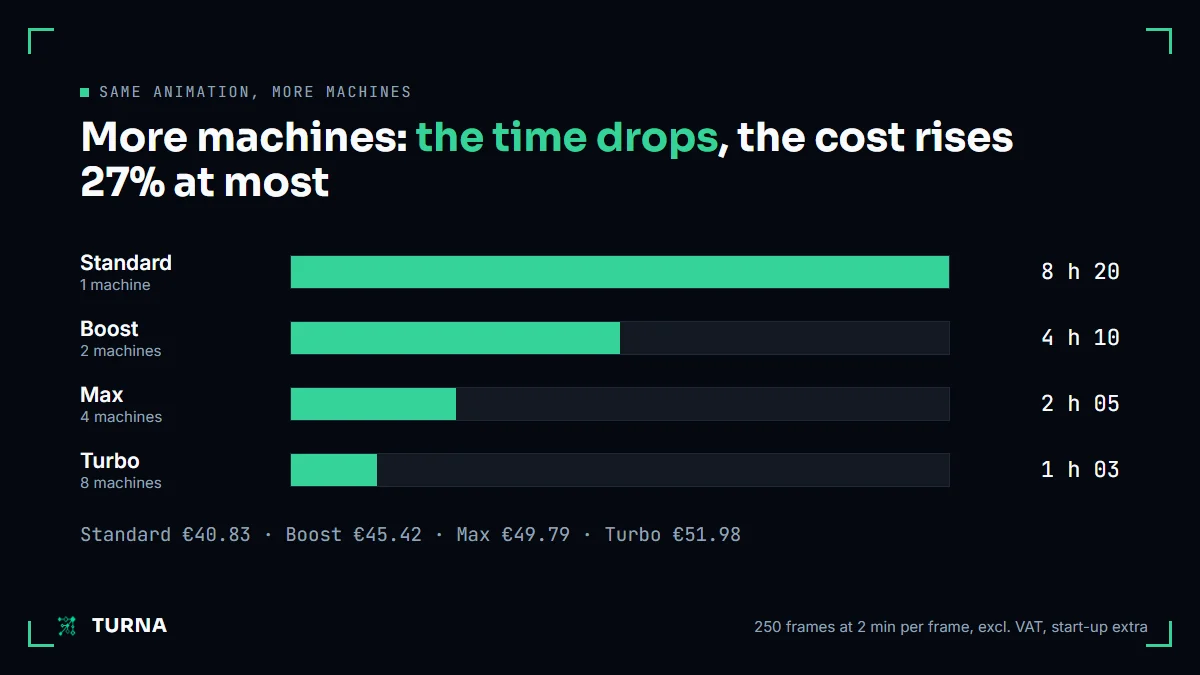
TURNA renders Blender scenes only, with Cycles and Eevee. It charges €4.90 per hour on 1 machine, €10.90 on 2, €23.90 on 4 and €49.90 on 8, excluding VAT, billed on the time actually used, with a 2-minute minimum. The tier sets how many machines render in parallel; the price is the same whichever card renders your scene, an RTX 4090 or an RTX 5090 (the 5090 only from Blender 4.4). Here is the same 250-frame shot at 2 minutes per frame on each tier, assuming a TURNA machine renders a frame as fast as the computer where you timed it:
| Tier | Machines | Price per hour | Render time | Cost |
|---|---|---|---|---|
| Standard | 1 | €4.90 | 8 h 20 | €40.83 |
| Boost | 2 | €10.90 | 4 h 10 | €45.42 |
| Max | 4 | €23.90 | 2 h 05 | €49.79 |
| Turbo | 8 | €49.90 | 1 h 03 | €51.98 |
Turbo finishes 8 times sooner than Standard for about 1.3 times the price: the compute is the same, the hourly rate of the faster tiers pays for the speed. The billed time runs from the start of the render to the last frame received, so it includes machine start-up and upload, and every render is billed at least 2 minutes (€0.16 on Standard). Before anything starts, the add-on shows the estimated time and cost of each tier for your scene; it is an estimate, not a cap, and the final price follows the actual time. Prices exclude VAT. For individuals in France, 20% VAT is added, which makes €5.88 per hour on Standard. The total including VAT is always shown before payment.
How to pay less on TURNA
- Pick Standard when there is no deadline. It has the lowest hourly price, and the compute is the same on every tier.
- Cut the time per frame first. The noise threshold and the Cycles speed settings lower every frame of the animation, on any farm.
- First top-up. Your first top-up of €10 excl. VAT or more is doubled, up to €10 in free credit. Once your account needs a top-up, you will have 3 days to use this offer, within 60 days of signing up.
- Students. Verified students get every top-up doubled, up to €50 of free credit a month: see the Blender render farm for students.
- Regular renders. The Pro plan costs €49 excl. VAT a month and credits 15 hours of Standard rendering, €73.50 of credits every month. No commitment. Your current credits stay yours.
Test before you compare
€25 to try it, no card needed. Your first 250 images are delivered, first render included. Beyond that, they stay on your account for 30 days, and your first payment from €6 incl. VAT (€5 excl. VAT) releases them all. The €25 credit covers about 5 hours on Standard, enough to render the same test frames you send to other farms. The free trial article gives the details. Comparing the result frame by frame, and the amount billed, tells you more than any price list.
Frequently asked questions
What is the cheapest render farm for Blender?
SheepIt, because it is free: you earn points by rendering other members' frames on your computer, and your own renders wait their turn in the queue. Among paid farms, none is the cheapest for every scene, because the bill depends on your time per frame: render the same test frames on each farm and compare the totals. TURNA, a render farm for Blender only, charges €4.90 per hour on 1 machine, €10.90 on 2, €23.90 on 4 and €49.90 on 8, excluding VAT, billed on the time actually used, with a 2-minute minimum.
Is there a free render farm for Blender?
Yes, SheepIt. You earn points by letting your computer render frames for other members, then spend them on your own renders. It costs no money, but the wait depends on the queue and no deadline is guaranteed. If you own several computers, Flamenco, the free render manager from Blender Studio, splits an animation across them.
How do I work out what a render farm will cost for my animation?
Time one busy frame with your final settings, then: minutes per frame × frames ÷ machines ÷ 60 × price per hour. For 250 frames at 2 minutes per frame, that is €40.83 on TURNA's Standard tier (1 machine) and €51.98 on Turbo (8 machines), excluding VAT, assuming a TURNA machine renders a frame as fast as the computer where you timed it.
How much does TURNA cost per hour?
€4.90 per hour on 1 machine, €10.90 on 2, €23.90 on 4 and €49.90 on 8, excluding VAT. The tier sets how many machines render in parallel, not the card. Rendering is billed on the time actually used, with a 2-minute minimum, with no subscription required, and new accounts get €25 of free credit with no card.
Is TURNA cheaper than other render farms?
It depends on your scene, and this page does not quote other farms' prices: they change, and only each farm's own price list is binding. Render the same few frames of your scene with each farm's free credits and compare the totals. TURNA's add-on shows its estimated cost before anything starts.
Are there hidden costs on TURNA?
You pay the render time at the hourly price of your tier. The billed time runs from the start of the render to the last frame received, so machine start-up and upload are included, and every completed render is billed at least 2 minutes (€0.16 on Standard). There is no subscription to take and no separate fee to upload a scene or download the frames. Prices exclude VAT.
Rendering the animation on TURNA
When a scene is already well optimised and the frame count is what takes the time, the remaining lever is rendering several frames at once on a render farm. TURNA does this for Blender: an add-on (Blender 4.0 to 5.3, Cycles and Eevee) sends the scene in one click, and the frames are split across 1, 2, 4 or 8 GPUs in parallel, on RTX 4090 and RTX 5090, the card chosen to suit the scene (the 5090 only from Blender 4.4). The add-on shows the estimated cost before anything starts. Prices start at €4.90 per hour, billed on the time actually used, with a 2-minute minimum, and €25 of free credit is added once your email address is confirmed and the onboarding questionnaire is answered, no credit card, once per person. A single still image is still rendered by one machine, so the gain is on animations. Tiers and worked examples are on the Blender render farm page.
To price your own scene, enter its time per frame in the render time calculator, and how much a render farm costs explains each pricing model. The pricing page details each tier, and the Blender render farm add-on page shows how the estimate appears in Blender before you launch.